Hello Kitty: Kids Hospital
- 4.8
- Rating
- 10.00M
- Installs
- Free
- Price
 Analysis by App-foxy
When I first opened Hello Kitty: Kids Hospital, I expected a simple character game, but it works better as a gentle introduction to hospital routines. It is an educational game from Hippo Kids Games in which children help Hello Kitty care for patients. The presentation is friendly rather than intimidating, and the familiar character gives young players an easy reason to explore what happens in a children’s hospital.
The main appeal is not medical accuracy in the professional sense. This is a playful way to make words such as patient, doctor, treatment, and hospital feel less unfamiliar. I found it most useful for children who enjoy role-play and need a calm activity with clear goals. It is free to start, rated Everyone, and available for devices running Android 7.0 or later. Optional purchases range from $0.99 to $9.99 per item, so I would still check the purchase settings before handing the device to a child.
What to expect when you enter the hospital
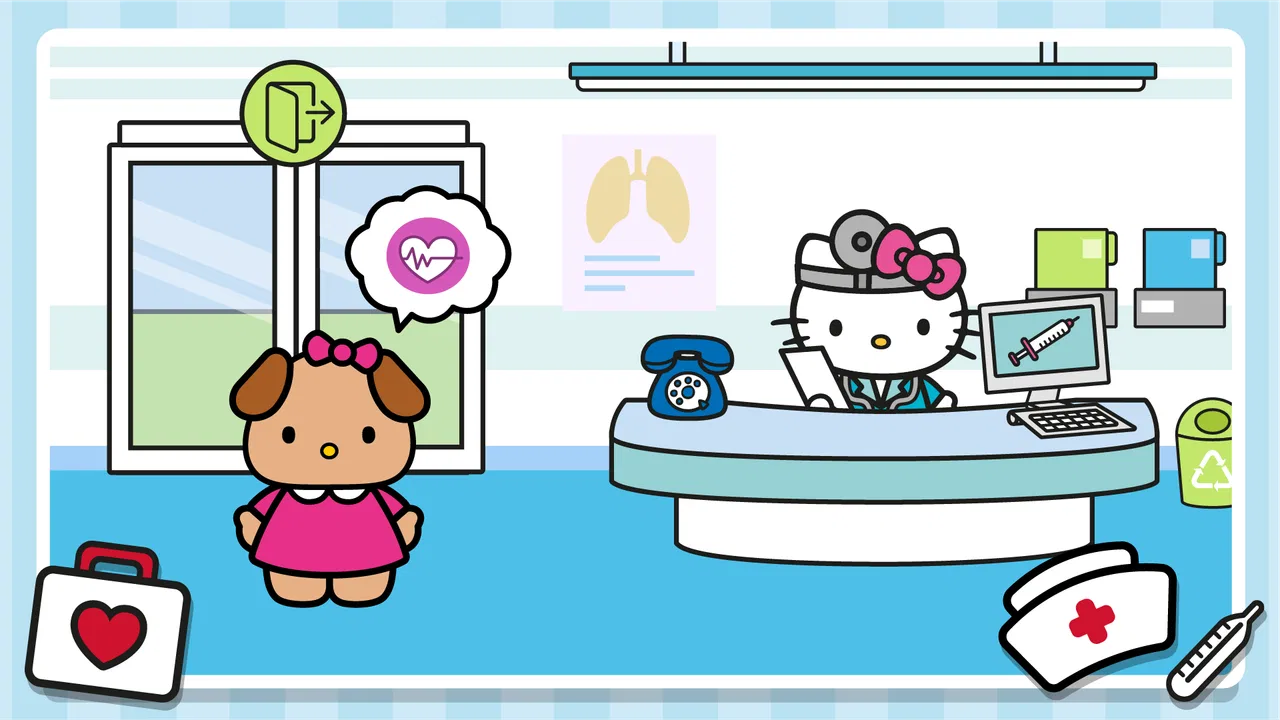
The game places Hello Kitty in a kids’ hospital setting and turns care into a sequence of approachable activities. Rather than asking a child to read long instructions, it relies on recognizable characters, visual prompts, and direct interaction. That makes the first few minutes reassuring: the player can concentrate on noticing what needs attention instead of trying to understand a complicated interface.
You May Also Like

 Blood Strike: 2.5 Anniversary
Blood Strike’s Loadouts Turn Every Drop Into a Tactical Gamble
A close look at Blood Strike’s custom loadouts: how fast access to signature weapons reshapes its battle royale rhythm, rewards preparation, and narrows the gap between fights.

 Pandora - Music & Podcasts
Pandora’s Music Is Easy to Start, but Harder to Recover
Pandora’s strength is its low-effort path from a seed to a station. Its weak spot is how much confidence it asks you to place in connection, setup, and quiet recovery.

 8 Ball Pool
 Is Built on Rivalries, Rematches, and Routine
A close look at the rivalries, rematches, shared routines, and unanswered safety questions that turn a quick pool match into a persistent mobile community.

 Samsung Music
’s Quiet Strength Is Playing What You Already Own
Its reach comes less from spectacle than from dependable access to a personal library. That simplicity is both the app’s strongest retention engine and its ceiling.

 AccuWeather: Weather Radar
AccuWeather Review: A Quick, Clear Forecast for Everyday Decisions
For everyday plans, the best forecast is the one you can understand quickly. AccuWeather makes rain timing, radar, and local conditions easy to act on, with a few trade-offs.

 Hill Climb Racing
Why Hill Climb Racing Still Turns Crashes Into One More Run
A tiny car, a bumpy hill and one more upgrade: Hill Climb Racing keeps resurfacing because its simple chaos makes every near-miss feel personal.
More From Our News Desk



My first impression was that the tone is designed for younger children who may already know Hello Kitty but have little patience for menus. The colorful presentation helps, although parents should remember that a familiar character does not automatically make every activity educational in depth. The learning comes from the context and the act of helping, not from detailed explanations of medicine.
As a game in the educational category, it sits closer to guided pretend play than to a serious health lesson. That distinction matters. I would use it to start a conversation about visiting a doctor, looking after someone who feels unwell, or why hospitals have different jobs. I would not use it as a substitute for medical advice or as a way to teach children how to diagnose real symptoms.
The game is especially suitable for a short, shared session. A parent can sit beside a child and ask simple questions: “Who needs help first?” or “What do you think the doctor is doing?” Those questions turn tapping through the activity into a small storytelling exercise. Without that conversation, a child may still enjoy it, but the educational value can remain fairly light.
Its popularity also gives some useful context. The game has an average rating of 4.8 from around 27 thousand ratings, and it has passed 10 million installs. I would not treat those figures as a guarantee that every child will enjoy it, but they do show that this particular Hello Kitty hospital concept has reached a large audience.
Who will enjoy it most
I would recommend it first to preschool and early-primary children who like caring for characters, following visual directions, and pretending to be helpful. It can also work for a child who feels nervous about hospitals, because the setting is softened by Hello Kitty and the focus stays on assistance rather than fear.
It is less suitable for children looking for open-ended construction, competitive play, or a complex simulation. There is no reason to choose this title for an older player who wants realistic medical decisions or difficult puzzles. Even younger children who prefer fast action may lose interest once the novelty of the hospital setting fades.
Getting started without turning setup into a chore
The game is free to download, which makes it easy to try before deciding whether it belongs on a child’s regular device. I would install it while connected to a reliable network, open it once myself, and check how the first activities feel before inviting a child to play. That small preview helps me judge whether the pace suits the child and whether the on-screen purchase options need extra supervision.
The current version is 1.10.5. I would keep the app updated through the normal device store when possible, especially if a child is using a newer phone or tablet. The minimum operating-system requirement is Android 7.0, so older devices may not be suitable. On a shared family tablet, it is also sensible to make sure the child profile cannot approve purchases without an adult.
There is no complicated account-building routine that I needed to explain before beginning. The practical preparation is mostly about the device: set a comfortable volume, remove distractions, and decide whether the child will play independently or with an adult nearby. For a first session, I prefer a quiet environment because children can then focus on the visual sequence instead of rapidly tapping through it.
The age rating is Everyone, which matches the gentle style, but I still would not leave a very young child alone with any app that contains optional purchases. The rating describes the general suitability of the content; it does not replace a parent’s decision about screen time, spending, or whether the child understands the activity.
Making the first session feel successful
I found that the best approach is to let the child watch the opening screen briefly, then ask what they think Hello Kitty is there to do. That gives the child ownership of the first decision. If they immediately tap everywhere, I would not interrupt too quickly. The visual feedback is part of learning the interface, and a short period of discovery can be more useful than constant adult instructions.
When the game presents a patient or a task, I would encourage the child to look at the whole scene before selecting anything. This is a surprisingly useful habit. Young players often tap the most colorful object, while the intended action may be indicated by a quieter visual cue. Waiting a moment helps them connect the patient’s situation with the action that follows.
A meaningful first success is not simply reaching the next screen. It is when the child can explain, in their own words, who needed help and what they did. I would celebrate that explanation rather than the speed of completion. This keeps the activity focused on care and observation, which are more valuable here than winning quickly.
One practical tip is to play alongside the child during the first attempt, then step back on the second. On the first pass, I can explain unfamiliar hospital ideas without taking control. On the next pass, I can see whether the child remembers the sequence. That makes the game a useful observation tool for parents: it shows whether the child is following the situation or merely repeating taps.
A realistic everyday use case
Imagine a child has a hospital appointment the next morning and is asking what will happen. I would use this game for a short session before bedtime, not as a promise that the real visit will look identical. We could talk about how real doctors and nurses help people, then play through the hospital scenario and let the child ask questions. The app gives the conversation a concrete starting point without presenting the appointment as something frightening.
It can also fill a waiting period at home when a child is recovering and needs a quiet activity. In that situation, I would keep the session brief and avoid presenting the game as a reward for being sick. The stronger use is emotional: it lets the child play the helper and imagine a caring environment while resting.
Understanding the first successful action
The first completed care activity teaches the game’s basic rhythm: notice the patient, identify the likely need, choose an action, and observe the result. That rhythm is simple, but it gives children a small sense of responsibility. I liked that the player is not merely watching Hello Kitty; the child is invited to participate in the care process.
For a first-time user, the most important advice is to avoid rushing past the result. After the action finishes, pause and ask what changed. Did the patient look more comfortable? Did Hello Kitty move to another task? Even if the game communicates the answer visually, putting it into words strengthens the educational side.
Another useful technique is to let the child make a harmless mistake before helping. If the game allows an incorrect tap to be corrected, that moment can teach the child that exploring is safe. I would offer a hint only after the child has had time to inspect the screen. Immediate adult guidance can make the game feel like a test, while gentle trial and error makes it feel like play.
The title also works well as a language prompt for children learning English. A parent can repeat simple words connected with the scene, such as patient, hospital, help, and doctor. I would keep the vocabulary limited and natural rather than turning the session into a lesson. The visual context makes the words easier to remember than an isolated vocabulary list.
There is a trade-off here. The simplicity that makes the game accessible can also make success feel predictable for children who are already comfortable with touch-screen games. If your child finishes the first activities without thinking, add a small challenge by asking them to describe the order of care or invent a kind sentence for the patient. The app itself may not provide enough complexity for an advanced player, but a parent can add meaningful reflection.
Where the design helps young players
Hello Kitty is doing more than decorating the hospital. Her presence lowers the emotional distance between the child and the setting. A hospital can be an abstract or uncomfortable place, while a familiar character makes it easier to imagine helping someone there. I noticed that this is most effective when the adult follows the child’s lead instead of explaining every detail in advance.
The visual approach also reduces the reading burden. That matters for children who cannot yet read independently or who become frustrated by dense instructions. They can learn the interaction through the scene itself. However, parents should not assume that every child will understand the visual cues immediately. If a child keeps tapping randomly, point to the patient first and ask what seems to need attention, rather than simply telling them which button to press.
The game’s strongest educational moment is therefore social and emotional: noticing another character’s need and responding. That is different from teaching anatomy or medical procedure. I consider this a strength when the goal is comfort, empathy, and basic sequencing, but a limitation when a parent expects factual health education.
Common confusion and the points that may frustrate you
The first likely confusion is knowing whether a tap has been accepted or whether the child has only selected an object. Young players may repeat the same action because they expect an immediate dramatic response. I would encourage them to watch the character and the patient after each tap. The reaction often provides more information than the button itself.
A second issue is the difference between playing independently and playing meaningfully. A child can sometimes move forward by tapping quickly, but that does not mean they understood the care sequence. If your goal is learning, slow the session down and ask for an explanation after each completed task. If your goal is simply a calm distraction, independent tapping may be perfectly acceptable.
Optional purchases are another point parents should handle before the child begins. The game is free, but individual in-app items cost between $0.99 and $9.99. I would configure purchase approval on the device and explain to the child that free access does not mean every extra item is automatically available. This is a small preparation step that prevents a common family argument later.
The game may also feel repetitive to children who want a changing challenge every few minutes. Its hospital theme and gentle pace are part of its identity, so I would not expect the same variety found in a broad collection of educational mini-games. If your child enjoys repeating familiar care routines, that repetition can be comforting. If they need constant novelty, another educational title may hold attention better.
Parents should also be careful with the word “medical.” The game presents a playful hospital scenario, not a reliable guide to real treatment. I would never use an action in the game to explain what a child should do for an actual injury or illness. For real concerns, a qualified healthcare professional remains the right source.
How it compares with usual alternatives
Compared with ordinary puzzle games, this title adds a clear caring role and a recognizable setting. Compared with broad early-learning apps, it is more focused: the child repeatedly returns to the idea of helping patients. That focus makes it easier to connect with a hospital conversation, but it also means fewer unrelated learning topics.
Compared with realistic doctor simulators, it is much softer and easier to approach. That is a benefit for young children and for anyone who might be unsettled by realistic medical imagery. The cost is depth. A child will not get the detailed decision-making, terminology, or problem-solving that an older player might expect from a simulation.
I would choose this game over a generic cartoon activity when the child is specifically interested in Hello Kitty or curious about hospitals. I would choose a more structured learning app when I need measurable practice in reading, numbers, or a particular school skill. The right choice depends on whether the desired outcome is emotional familiarity and pretend care or academic progression.
What to try next after the first session
Once the child understands the basic interaction, I would stop giving step-by-step instructions and ask them to lead. Let them decide what they notice first, then listen to their reasoning. This turns a short game into a small exercise in observation and communication. If they ask a real medical question, answer it simply and honestly, and make clear that the game is pretend.
A useful follow-up is to draw a tiny hospital scene together after playing. The child can add Hello Kitty, a patient, and the person who helps them. This is not required to enjoy the game, but it reveals which parts of the experience stayed in memory. It also gives children who are less comfortable with direct conversation another way to express what they think hospitals are like.
I would keep sessions flexible rather than setting a rigid target. A child may be satisfied after one activity, while another may want to repeat it. The game is best used as one calm option among other play, reading, and real-world conversation. Its gentle style makes it easy to return to, but repeated tapping without engagement offers less value than a shorter session with attention.
Hippo Kids Games has made a welcoming character game for children who enjoy pretend responsibility. The free entry point, Everyone rating, and simple hospital theme make it approachable, while the optional purchases mean adults should prepare the device first. The large audience and 4.8 average suggest strong general appeal, but the experience remains intentionally light.
My final recommendation is straightforward: choose it if you want a friendly way to introduce hospital vocabulary, caring behavior, and simple visual sequences. Skip it if you are looking for a realistic medical simulator, advanced educational progression, or a game built around competition. For a first-time player, the winning formula is to preview the opening, let the child complete one action independently, and then talk about what happened. The best value comes from turning Hello Kitty’s hospital visit into a shared conversation, not just a series of taps.
FAQs for Hello Kitty: Kids Hospital
01What is Hello Kitty: Kids Hospital about?
Hello Kitty: Kids Hospital is a delightful game designed for children, where players can join Hello Kitty and her friends in managing a fun and interactive hospital. The game includes various activities like treating patients, managing hospital tasks, and learning about basic medical care, all within a colorful and engaging environment.
02Is Hello Kitty: Kids Hospital safe for children to play?
Yes, Hello Kitty: Kids Hospital is designed specifically for children and is safe for them to play. The game features age-appropriate content, friendly characters, and educational elements that promote learning about healthcare in a fun way. Parental controls can be set to ensure a safe gaming experience.
03What platforms is Hello Kitty: Kids Hospital available on?
Hello Kitty: Kids Hospital is available for download on both Android and iOS devices. It can be found on the Google Play Store for Android users and the Apple App Store for iOS users. The game is compatible with most smartphones and tablets, ensuring accessibility for a wide audience.
04Are there any in-app purchases in Hello Kitty: Kids Hospital?
Yes, Hello Kitty: Kids Hospital offers in-app purchases. While the game itself is free to download, certain items, features, or enhancements can be purchased to enhance gameplay. Parents are advised to monitor in-app purchases to manage spending and ensure a balanced gaming experience for their children.
05What age group is Hello Kitty: Kids Hospital suitable for?
Hello Kitty: Kids Hospital is primarily targeted at children aged 4 to 10 years old. The game’s design, activities, and educational content are tailored to be engaging and understandable for this age group, fostering creativity, responsibility, and basic healthcare knowledge in a playful manner.
Pros
- Engaging for young children.
- Educational medical scenarios.
- Colorful graphics and design.
- Simple controls for easy play.
- Promotes empathy and care.
Cons
- In-app purchases can add up.
- Limited appeal to older kids.
- Requires internet connection.
- Repetitive gameplay may bore.
- Ads may interrupt play.

Hello Kitty: Kids Hospital
Gallery